
The best hardware wallet is the one you will set up and use correctly. A hardware wallet is a small device that keeps the keys to your crypto offline. For most beginners the choice comes down to Ledger or Trezor, and the right pick depends on whether you care most about convenience or about open-source code.
Affiliate disclosure: some links on this site are affiliate links. If you buy through them we may earn a commission at no extra cost to you. We have not tested these devices ourselves. This guide is based on each maker’s published information and the independent sources listed at the bottom, checked in October 2026. Prices change, so confirm them with the maker. Education only, not financial, legal or tax advice. See our disclosures.
The short answer
- Want a polished app and phone support? Look at Ledger (for example the Nano Gen5).
- Want open-source code you can inspect? Look at Trezor (Safe 3, Safe 5 or Safe 7).
- Mostly Bitcoin and comfortable with a learning curve? Coldcard and Blockstream Jade are options that focus on verifiability and air-gapped use.
Whichever you choose, the device does not protect you if someone gets your recovery phrase. Read What Is a Seed Phrase? How to Store It Safely before you buy.
Do you need a hardware wallet at all?
People usually consider one when they hold an amount they would not want to lose, or plan to hold for a long time. Small amounts you use often can live in a regular wallet app. Funds on an exchange are held by the exchange, so they are not in a wallet you control.
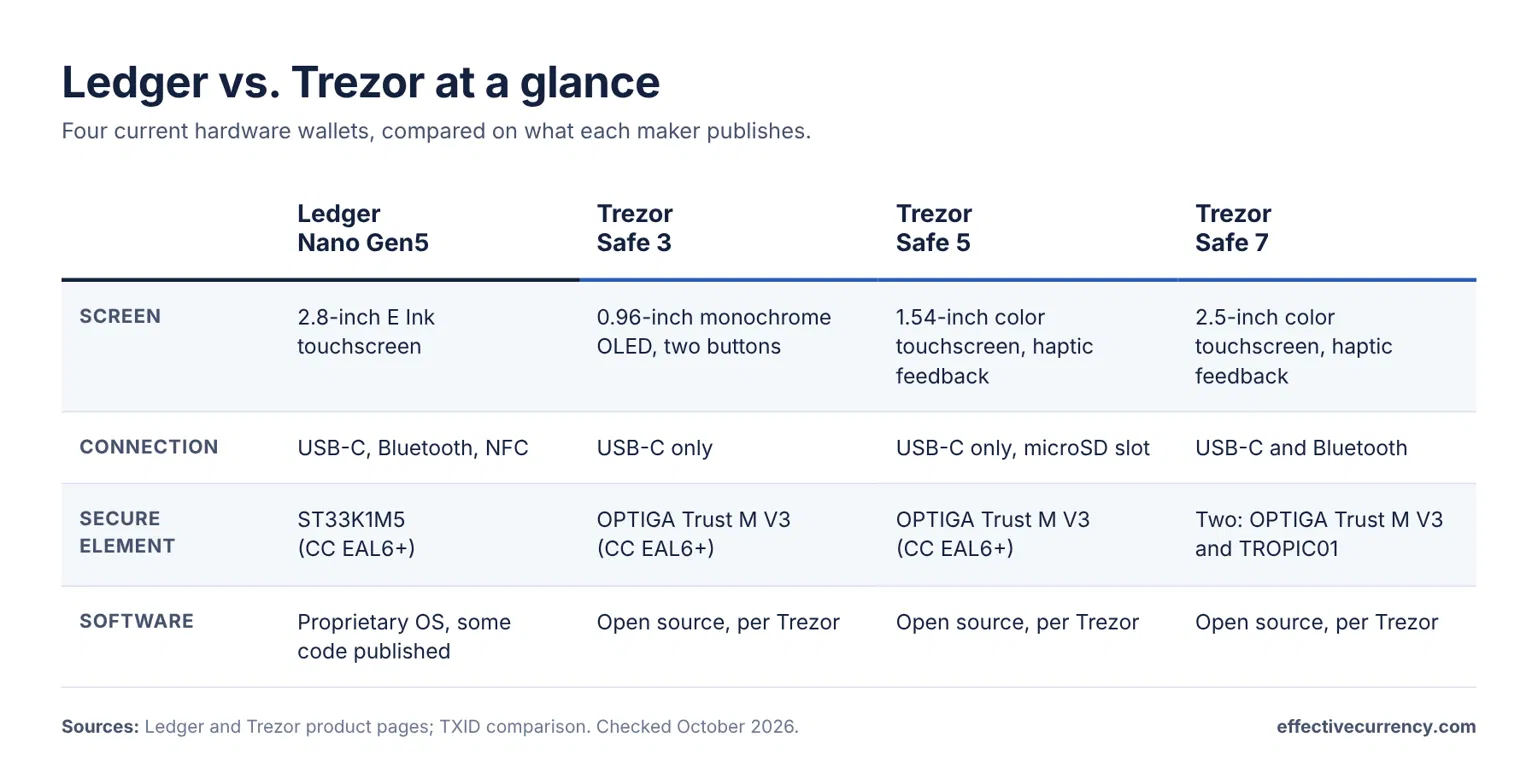
Side by side
| Ledger Nano Gen5 | Trezor Safe 3 | Trezor Safe 5 | Trezor Safe 7 | |
|---|---|---|---|---|
| Secure element | ST33K1M5, rated CC EAL6+ | OPTIGA Trust M V3, rated CC EAL6+ | OPTIGA Trust M V3, rated CC EAL6+ | Two: OPTIGA Trust M V3 and TROPIC01 |
| Screen | 2.8-inch E Ink touchscreen | 0.96-inch monochrome OLED, two buttons | 1.54-inch color touchscreen | 2.5-inch color touchscreen |
| Connection | USB-C, Bluetooth, NFC | USB-C | USB-C, microSD slot | USB-C, Bluetooth |
| Software | Closed secure-element app; part of the firmware is open | Open-source hardware and firmware per Trezor | Open-source per Trezor | Open-source per Trezor |
Sources: Ledger and Trezor product pages, TXID comparison. Ledger says Ledger Wallet supports 1000s of cryptocurrencies, and other assets work through third-party wallets that Ledger does not guarantee. Check each maker’s site for the current list and prices.
Where to see current prices (affiliate links, see the disclosure above):
How to choose the best hardware wallet
1. Secure element vs. open source
The TXID security comparison explains the trade-off. Open-source designs help guard against a vendor hiding a backdoor. Secure-element chips help guard against someone with physical access to a stolen device. Which matters more depends on your situation. The same comparison notes that Ledger’s secure-element application is closed, which limits independent audits, and that Ledger’s 2023 “Recover” service weakened its earlier claim that the seed could never leave the device.
2. Connection and convenience
Bluetooth is convenient with a phone, but the TXID comparison points out that it adds attack surface. The Trezor Safe 3 and Safe 5 use USB-C only, with no Bluetooth.
3. Screen and ease of use
A larger touchscreen makes it easier to read and confirm the details of what you are signing. The Safe 3 uses a small screen and two buttons, while the Safe 5, Safe 7 and Nano Gen5 use touchscreens.
4. Coins you plan to hold
Check that the wallet supports every coin you plan to hold before you buy. Ledger says its Ledger Wallet app supports 1000s of cryptocurrencies. Look up Trezor’s current list on its own site.
Bitcoin-focused options
If you hold mostly Bitcoin, the TXID comparison also covers Coldcard Mk4 and Blockstream Jade. Both are fully open source with reproducible builds and can be used air-gapped (Coldcard through an SD card, Jade through QR codes). They are generally harder to learn. The same article suggests that very large holdings may call for a multisig setup across different vendors.
How to buy safely
- Buy from the maker or an authorized reseller. Trezor says its own store is the best place to buy, and that its official resellers receive stock directly from Trezor.
- Be careful with search results. Fake “setup” and “start” pages that imitate wallet makers exist. Type the maker’s address yourself.
- Never type your recovery phrase into a website, app or support chat. No legitimate company will ask for it.
- Test your backup. Send a small amount first, then restore from your written words before you move savings.
Frequently asked questions
Is a hardware wallet safer than an exchange?
They are different. On an exchange the company holds the keys. With a hardware wallet you hold them, which also means you are responsible for the backup.
What happens if I lose the device?
Your funds can be restored from your recovery phrase on a compatible wallet. That is why the written backup matters more than the device.
Ledger or Trezor?
See our side-by-side comparison: Ledger vs. Trezor.
Read next: Trezor Safe 3 vs Safe 5 vs Safe 7, covering the differences between Trezor’s three current models.
Not sure yet? Our free 7-Minute Stablecoin Safety Checklist covers backups, test transfers and common scams.
Sources
- Ledger, Ledger Nano Gen5 product page. Checked October 2026. The publisher sells hardware wallets.
- Trezor, Trezor hardware: built-in security. Checked October 2026. The publisher sells hardware wallets.
- Trezor Support, Where to buy a genuine Trezor hardware wallet. Checked October 2026.
- TXID, Coldcard, Jade, Trezor, Ledger: A Security Model Comparison. Checked October 2026. The article covers the Trezor Safe 3 and Ledger Nano X and Stax, not the Nano Gen5, Safe 5 or Safe 7, and states no affiliations.